#include <lwpp/panel.h>
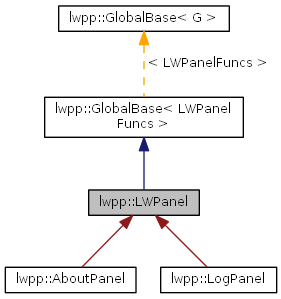
 Inheritance diagram for lwpp::LWPanel:
 Collaboration diagram for lwpp::LWPanel: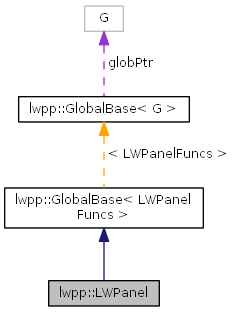
Public Member Functions | |
| LWPanel () | |
| Default Constructor. | |
| LWPanel (const std::string _title) | |
| Constructor defining a panel title as well. | |
| LWPanel (LWPanelID pan_id) | |
| Constructor from an existing LWPanel. | |
| ~LWPanel () | |
| Destructor. | |
| virtual bool | available () const |
| Check if the global is available. | |
| void | ClearID () |
| void | Close () |
| Close the panel. | |
| void | Create (const std::string _title, bool _close_on_destroy=true) |
| Creates a panel. | |
| void | Draw (DrMode mode=DR_REFRESH) |
| virtual LWPanelFuncs * | getGlobal () |
| Get the pointer to the global. | |
| int | GetHeight () const |
| Get panel height in pixels. | |
| LWPanelID | GetID () const |
| Returns the ID of the panel as a LWPanelID. | |
| int | GetInt (pTag tag) const |
| void * | GetPointer (pTag tag) |
| int | GetQualifiers () |
| Get the panel qualifier keys. | |
| void * | GetUserData () |
| Get the panel user data. | |
| int | GetWidth () const |
| Get panel width in pixels. | |
| GlobalFunc * | globalFun () |
| Returns the global. | |
| int | Handle (int block) |
| LWControl * | nextControl (LWControlID *ctl) |
| int | Open (int flags) |
| Opens and displays the panel. | |
| LWPanelFuncs * | operator-> () |
| Get the pointer to the global. | |
| LWPanel & | operator= (const LWPanel &from) |
| Copy constructor. | |
| int | Post (int flags=0) |
| void | Recreate () |
| Recreates the panel. | |
| void | Recreate (const std::string _title) |
| void | Set (void *p, pTag tag) |
| void | Set (int i, pTag tag) |
| void | Set (pTag tag, void *p) |
| template<typename T > | |
| void | SetCallbacks (T *host) |
| void | SetHeight (int h) |
| Set panel height in pixels. | |
| void | SetTitle (std::string &s) |
| void | SetUserActivate (LWPanHook d) |
| void | SetUserClose (LWPanHook d) |
| void | SetUserData (void *d) |
| Set the panel user data. | |
| void | SetUserDraw (LWPanDrawHook d) |
| void | SetUserKeys (LWPanKeyHook d) |
| void | SetUserKeyUp (LWPanKeyHook d) |
| void | SetUserMouseButton (LWPanMouseHook d) |
| void | SetUserMouseMove (LWPanMouseHook d) |
| void | SetUserOpen (LWPanHook d) |
| void | SetWidth (int w) |
| Set panel width in pixels. | |
| void | ToFront () |
| Bring the panel to the front. | |
| void * | user_data () |
| Returns a pointer to the userdata. | |
Drawing | |
Drawing related functionality | |
| LWDrawFuncs | getDrawFuncs () |
| Returns the draw functions for the panel. | |
| void | DrawLine (int color, int x1, int y1, int x2, int y2) |
| Draws a line. | |
| void | DrawBorder (int indent, int x, int y, int w, int h=0) const |
| Draw a Border. | |
| void | DrawResizeHandle () |
| Draw a resizing handle on the lower left corner. | |
Controls | |
Controls that can be created with LWPanels | |
| LWControl * | AddChoice (const char *title, const char **items, bool orientation) |
| Adds a series of mutually exclusive buttons. | |
| LWControl * | AddPopUp (const char *title, const char **items, int width=0) |
| LWControl * | AddFloat (const char *title, LWType type=LWT_FLOAT) |
| LWControl * | AddDistance (const char *title) |
| LWControl * | AddFloatInfo (const char *title) |
| LWControl * | AddFloatVector (const char *title, LWType type=LWT_VFLOAT) |
| LWControl * | AddDistanceVector (const char *title) |
| LWControl * | AddFloatVectorInfo (const char *title) |
| LWControl * | AddItem (const char *title, LWItemType type, int width=0) |
| Adds a pop up filled up with items present on the scene. | |
| LWControl * | AddPickItem (const char *title, LWItemType type, int width) |
| LWControl * | AddButton (const char *title, int width=0) |
| LWControl * | AddBoolean (const char *title, int width=0) |
| LWControl * | AddBoolButton (const char *title, int width=0) |
| LWControl * | AddInteger (const char *title, int width=0) |
| LWControl * | AddIntegerInfo (const char *title, int width=0) |
| LWControl * | AddSlider (const char *title, int min, int max, int width, const char *type="SliderControl") |
| LWControl * | AddVerticalSlider (const char *title, int min, int max, int width) |
| LWControl * | AddHorizontalSlider (const char *title, int min, int max, int width) |
| LWControl * | AddUnboundSlider (const char *title, int min, int max, int width) |
| LWControl * | AddMiniSlider (const char *title, int min, int max, int width) |
| LWControl * | AddVector (const char *title, const char *type="VecControl") |
| LWControl * | AddVectorInfo (const char *title) |
| LWControl * | AddRGB (const char *title) |
| LWControl * | AddMiniRGB (const char *title) |
| LWControl * | AddMiniHSV (const char *title) |
| LWControl * | AddRGBVector (const char *title) |
| LWControl * | AddString (const char *title, int width, const char *type="EditControl") |
| LWControl * | AddStringInfo (const char *title, int width) |
| LWControl * | AddFile (const char *title, int width) |
| LWControl * | AddFileButton (const char *title, int width) |
| LWControl * | AddLoad (const char *title, int width) |
| LWControl * | AddLoadButton (const char *title, int width) |
| LWControl * | AddSave (const char *title, int width) |
| LWControl * | AddSaveButton (const char *title, int width) |
| LWControl * | AddDir (const char *title, int width) |
| LWControl * | AddDirButton (const char *title, int width) |
| LWControl * | AddText (const char *title, const char **text) |
| LWControl * | AddArea (const char *title, int width, int height, const char *type="AreaControl") |
| LWControl * | AddOpenGL (const char *title, int width, int height) |
| LWControl * | AddCanvas (const char *title, int width, int height) |
| LWControl * | AddDragButton (const char *title, int width, int height) |
| LWControl * | AddVDragButton (const char *title) |
| LWControl * | AddHDragButton (const char *title) |
| LWControl * | AddDragArea (const char *title, int width, int height) |
| LWControl * | AddBorder (const char *title, int width, int height) |
| LWControl * | AddChannel (const char *title, int width, int height) |
| LWControl * | AddPalette (const char *title, int width, int height) |
| LWControl * | AddPercent (const char *title) |
| LWControl * | AddAngle (const char *title) |
| LWControl * | AddCustomPopup (const char *title, int width, int(*count)(void *), char *(*name)(void *, int)) |
| template<typename T > | |
| LWControl * | AddCustomPopup (const char *title, int width) |
| LWControl * | AddPopdown (const char *title, const char **items) |
| LWControl * | AddTabs (const char *title, const char **items) |
| LWControl * | AddXPanel (const char *title, LWXPanelID xp) |
| LWControl * | AddListbox (const std::string &title, int width, int(*count)(void *), char *(*name)(void *, int), int items, int topVisible=0) |
| template<typename T > | |
| LWControl * | AddListbox (const std::string &title, int width, int items, int topVisible=0) |
| template<typename T > | |
| void | AddListbox (PanelControl &control, const std::string &title, int width, int items, int topVisible=0) |
| Adds a series of mutually exclusive buttons. | |
| template<typename T > | |
| void | AddListbox (PanelControl &control, int width, int items, int topVisible=0) |
| Adds a series of mutually exclusive buttons. | |
| template<typename T > | |
| LWControl * | AddListbox (int width, int items, int topVisible=0) |
| LWControl * | AddMultiListbox (const char *title, int width, int items, int topVisible, int(*count)(void *), char *(*name)(void *, int, int), int(*colwidth)(void *, int i)) |
| template<typename T > | |
| LWControl * | AddMultiListbox (const char *title, int width, int items, int topVisible=0) |
| Adds a multi-column list of items with a scroll bar. | |
| template<typename T > | |
| void | AddMultiListbox (PanelControl &control, const char *title, int width, int items, int topVisible=0) |
| Adds a series of mutually exclusive buttons. | |
| template<typename T > | |
| LWControl * | AddTree (const char *title, int width, int height) |
| Adds a Tree Control. | |
| LWControl * | AddTree (const char *title, int width, int height, int(*count)(void *data, void *node), void *(*leaf)(void *data, void *node, int i), char *(*info)(void *data, void *node, int *nodeFlags), void(*move)(void *data, void *node, void *parentNode, int i)=0) |
| Adds a Tree Control. | |
Static Public Member Functions | |
| template<typename T > | |
| static void | cb_PanActivate (LWPanelID id, void *userdata) |
| Callback for panel activation. | |
| template<typename T > | |
| static void | cb_PanClose (LWPanelID id, void *userdata) |
| Callback for panel close. | |
| template<typename T > | |
| static void | cb_PanDraw (LWPanelID id, void *userdata, DrMode DrawMode) |
| Callback for panel draw. | |
| template<typename T > | |
| static int | cb_PanKeyDown (LWPanelID id, void *userdata, LWDualKey key) |
| Static callback for key down. | |
| template<typename T > | |
| static int | cb_PanKeyUp (LWPanelID id, void *userdata, LWDualKey key) |
| Static callback for key up. | |
| template<typename T > | |
| static void | cb_PanMouseButton (LWPanelID id, void *userdata, int qualifiers, int x, int y) |
| Static callback for mouse button. | |
| template<typename T > | |
| static void | cb_PanMouseMove (LWPanelID id, void *userdata, int qualifiers, int x, int y) |
| Static callback for mouse move. | |
| template<typename T > | |
| static void | cb_PanOpen (LWPanelID id, void *userdata) |
| Callback for open panel. | |
| template<typename T > | |
| static void | cb_PanResize (LWPanelID id, void *userdata, int w, int h) |
| Callback for panel resize. | |
Protected Member Functions | |
| bool | _acquireGlobal () |
| LWControl * | addControl (const char *type, LWPanControlDesc *desc, const char *label) |
| Add a control to the panel. | |
| void | get (pTag tag, void *data) const |
| Get a panel attribute. | |
| void | set (pTag tag, void *data) |
| Set a panel attributes. | |
Static Protected Attributes | |
| static LWPanelFuncs * | globPtr |
| Pointer to the global functions. | |
Detailed Description
Wrapper for LWPanelFuncs The functions associated with the panel.
Constructor & Destructor Documentation
|
inline |
Default Constructor.
|
inline |
Constructor defining a panel title as well.
- Parameters:
-
_title a std:string with the title for the panel
|
inline |
Constructor from an existing LWPanel.
- Parameters:
-
pan_id The LWPanelID of an existing panel
|
inline |
Destructor.
Member Function Documentation
|
inlineprotectedinherited |
|
inline |
Adds a mini slider with an edit field, for values as angles. Internally the value is stored as Radians.

How to add a AddAngle control = Panel.AddAngle("Angle Value");
- Parameters:
-
*title The label for the control
|
inline |
Adds a rectagular Area with a border. The area can generate mouse clicks.
   @image html panelarea.jpg "An area of 75x50 pixels."
   How to add a AddArea
   control = Panel.AddArea("Area", 75, 50);
   @param *title The label for the control
   @param width The width in pixels of the control
   @param height The height in pixels of the control
   @param type Type of the control to allow this function be used by AddOpenGL for example
|
inline |
Adds a boolean button control
   @image html panelbooleanbut.jpg "A single boolean button"
   How to add a button
 control = Panel.AddBoolButton("Boolean Button", 100);
   @param *title The label for the control
   @param width The width of the control in pixels
|
inline |
Adds a boolean check control
   @image html panelboolean.jpg "A single boolean check"
   How to add a button
 control = Panel.AddBoolean("Boolean", 50);
   @param *title The label for the control
   @param width The width of the control in pixels
|
inline |
Adds a sized rectangle with a border.
   \xrefitem todo 9.        @image html panelborder.jpg "A border of 75x50 pixels."
   How to add a AddBorder
   control = Panel.AddBorder("Border", 75, 50);
   @param *title The label for the control
   @param width The width in pixels of the control
   @param height The height in pixels of the control
|
inline |
Adds a button control
   @image html panelbutton.jpg "A single button"
   How to add a button
 control = Panel.AddButton("Button", 50);
   @param *title The label for the control
   @param width The width of the control in pixels
|
inline |
Adds a rectagular drawing area with a border. The drawing area doesn't include the 1 pixel border.
   @image html panelcanvas.jpg "An area of 75x50 pixels."
   How to add a AddCanvas
   control = Panel.AddCanvas("Canvas", 75, 50);
   @param *title The label for the control
   @param width The width in pixels of the control
   @param height The height in pixels of the control
|
inline |
Adds a sized tree with the channels present on the scene.
   @image html pannelchannels.jpg "A channels tree of 125x300 pixels."
   How to add a AddChannel
   control = Panel.AddChannel("Channels", 125, 300);
   @param *title The label for the control
   @param width The width in pixels of the control
   @param height The height in pixels of the control
|
inline |
Adds a series of mutually exclusive buttons.


- Parameters:
-
*title The label for the control **items Pointer to a NULL terminated array for the options. i.e: static char *choices[] = { "One", "Two", "Three", NULL }; orientation The orientation for the control
- Returns:
- a pointer to the created LWControl
How to add a AddChoice static char *choices[] = { "One", "Two", "Three", NULL }; control = Panel.AddChoice("PopUp", choices, true);
|
inlineprotected |
Add a control to the panel.
It must be called after create the panel but before opening it. The control is positioned below the previous created one. The order of creation of the controls affect it's drawing order. The control can be moved after create it. The panel will change it's size automatically to fit all the controls.
- Parameters:
-
*type pointer to a string indicating the type of control. *desc a pointer to a LWPanControlDesc structure *label a pointer to a string with the label for the control
- Returns:
- A pointer to a LWControl structure
|
inline |
Adds a customizable pop up control The (*count) and *(*name) callbacks are used to fill up the control instead of use static text for the options.
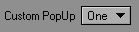

How to add a AddCustomPopup
- Parameters:
-
*title The label for the control width The width in pixels of the control (*count) Pointer to it's own count function. *(*name) Pointer to it's own name function.
|
inline |
Adds a customizable pop up control The (*count) and *(*name) callbacks are used to fill up the control instead of use static text for the options.
How to add a AddCustomPopup
- Parameters:
-
*title The label for the control width The width in pixels of the control
|
inline |
Adds a Directory file edit field with an arrow button to open the OS requester to select a directory
   @image html paneldir.jpg "A directory file edit field with a real dir name. 25 characters long."
   How to add a AddDir
   control = Panel.AddDir("Select Directory", 25);
   control.Set<const char *>("C:\\temp");
   @param *title The label for the control
   @param width The width in characters of the control
|
inline |
Adds a Select Directory button
   @image html paneldirbutton.jpg "A Select Directory button."
   How to add a AddDirButton
   control = Panel.AddDirButton("Select Directory", 65);
   @param *title The label for the control
   @param width The width in pixels of the control
|
inline |
Adds a numeric control for double values with support for units and their conversion
   @image html paneldistance.jpg "A numeric control for double values with units"
   How to add a AddDistance
   control = Panel.AddDistance("Double Value");
   @param *title The label for the control
|
inline |
Adds a numeric control for double vector values with support for units and their conversion
   @image html paneldistancevec.jpg "A numeric control for double vector values with units"
   How to add a AddDistanceVector
   control = Panel.AddDistanceVector("Double Vector Value");
   @param *title The label for the control
|
inline |
Adds a rectagular Drag Area with a border. The area can generate drag and mouse clicks.
   @image html paneldragarea.jpg "A drag area of 75x50 pixels."
   How to add a AddDragArea
   control = Panel.AddDragArea("Drag Area", 75, 50);
   @param *title The label for the control
   @param width The width in pixels of the control
   @param height The height in pixels of the control
|
inline |
Adds a drag button (mini slider) WITHOUT an edit field.
- Todo:
- This control doesn't resize. So width and height are not neccesary

How to add a AddDragButton control = Panel.AddDragButton("Drag Button", 10, 10);
- Parameters:
-
*title The label for the control width The width in pixels of the control height The height in pixels of the control
|
inline |
Adds a file edit field with an arrow button to open the OS requester to select files
   @image html panelfile.jpg "A file edit field with a fake file name. 25 characters long."
   How to add a AddFile
   control = Panel.AddFile("File", 25);
   control.Set<const char *>("C:\\temp.file");
   @param *title The label for the control
   @param width The width in characters of the control
|
inline |
Adds a file button
   @image html panelfilebutton.jpg "A file button."
   How to add a AddFileButton
   control = Panel.AddFileButton("File", 25);
   @param *title The label for the control
   @param width The width in pixels of the control
|
inline |
Adds a numeric control for double values
   @image html panelfloat.jpg "A numeric control for double values"
   How to add a AddFloat
   control = Panel.AddFloat("Double Value");
   @param *title The label for the control
   @param type Type of the control to allow this function be used by AddDistance for example
|
inline |
Adds a Read Only numeric control for double values
   @image html panelfloatinfo.jpg "A read only numeric control for double values"
   How to add a AddFloatInfo
   control = Panel.AddFloatInfo("Info Double Value");
   @param *title The label for the control
|
inline |
Adds a numeric control for double vector values
   @image html panelfloatvec.jpg "A numeric control for double vector values"
   How to add a AddFloatVector
   control = Panel.AddFloatVector("Double Vector Value");
   @param *title The label for the control
   @param type Type of the control to allow this function be used by AddDistanceVector for example
|
inline |
Adds a Read Only numeric control for double vector values
   @image html panelfloatvecinfo.jpg "A read only numeric control for double vector values"
   How to add a AddFloatVectorInfo
   control = Panel.AddFloatVectorInfo("Info Double Vector Value");
   @param *title The label for the control
|
inline |
Adds a horizontal drag button (mini slider) WITHOUT an edit field.
   @image html panelhdragbutton.jpg "A horizontal drag button control."
   How to add a AddHDragButton
   control = Panel.AddHDragButton("Horizontal Drag Button");
   @param *title The label for the control
|
inline |
Adds a horizontal slider without edit field.
   @image html panelhslider.jpg "A horizontal slider control with a (min = 0, max = 100). On the image it's value is 0."
   How to add a AddHorizontalSlider
   control = Panel.AddHorizontalSlider("Slider", 0, 100, 100);
   @param *title The label for the control
   @param min The minimun value for the slider
   @param max The maximun value for the slider
   @param width The width of the control in pixels
|
inline |
Adds a numeric control for integer values
   @image html panelinteger.jpg "A numeric control for integer values"
   How to add a AddInteger
   control = Panel.AddInteger("Interger Value", 80);
   @param *title The label for the control
   @param width The width of the control in pixels
|
inline |
Adds a Read Only numeric control for integer values
   @image html panelintinfo.jpg "A read only numeric control for integer values"
   How to add a AddIntegerInfo
   control = Panel.AddIntegerInfo("Info Integer Value", 80);
   @param *title The label for the control
   @param width The width of the control in pixels
|
inline |
Adds a pop up filled up with items present on the scene.
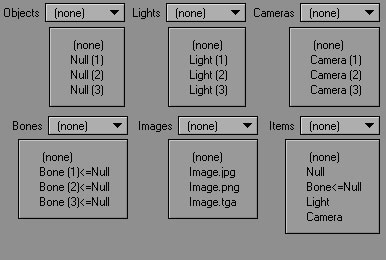
- Parameters:
-
*title The label for the control type The type of items to be listed. Defined on lwrender.h (line 22) width The width of the control in pixels
|
inline |
Adds a list of items with a scroll bar.
   @image html panellistbox.jpg "A List Box for 5 items. 150 pixels width."
   How to add a AddListbox
   @code
 static char *choices[] = { "One", "Two", "Three", NULL };

 static int lboxCount(void *);
 static char * lboxName(void *data, int index);

 int yourclass::lboxCount(void *){ return 3; }

 char * yourclass::lboxName(void *data, int index)
 {
   if ( index >= 0 && index < 3 )
     return choices[ index ];
   else
     return NULL;
 }

 // On yourclass::Options()
 control = Panel.AddListbox(std::string("List Box"), 150, &yourclass::lboxCount, &yourclass::lboxName, 5, 0);

   @endcode
   @param *title The label for the control as a std::string
   @param width The width in pixels of the control
   @param (*count) Pointer to it's own count function.
   @param *(*name) Pointer to it's own name function.
   @param items Number of visible items.
   @param topVisible The index of the item visible as the first item.
|
inline |
Adds a list of items with a scroll bar.
   @image html panellistboxt.jpg "A List Box for 5 items. 150 pixels width."
   How to add a AddListbox
   @code
 // On your header(yourclass.h) file:

 class yourclass: public lwpp::LWPanelMasterHandler,
          public lwpp::LWPanelControlCallBacks,
 {
 public:
   // CALLBACKS
   //! listBox count
   int controlCount(lwpp::PanelControl lwcontrol);

   //! control events
   virtual void controlEvent(lwpp::PanelControl& lwcontrol);

   //! listBox name
   const char * controlName(lwpp::PanelControl lwcontrol, int index);


   // Constructor & Destructor
   yourclass (void *priv, void *context, LWError *err);
   ~yourclass ();
 protected:
   // The member for the List Box control
   lwpp::PanelControl control;
 };

 // On your source (yourclass.cpp) file:
 static char *choices[] = { "One", "Two", "Three", NULL };

 //Constructor
 yourclass::yourclass( void *priv, void *context, LWError *err) :
   lwpp::LWPanelMasterHandler(priv, context, err),
 {
 }
 // Destructor
 yourclass::~yourclass(){ ; }

 // CONTROL COUNT CALLBACK
 int yourclass::controlCount(lwpp::PanelControl lwcontrol)
 {
   if (lwcontrol == control)
   {
     return 3;
   }
   return 0;
 }

 // CONTROL NAME CALLBACK
 const char * yourclass::controlName(lwpp::PanelControl lwcontrol, int index)
 {
   if (lwcontrol == control)
   {
     if ( index >= 0 && index < 3 )
       return choices[ index ];
     else
       return NULL;
   }
   return "";
 }

 // CONTROL EVENT CALLBACK
 void yourclass::controlEvent(lwpp::PanelControl& lwcontrol)
 {
   // If it's the list box
   if (lwcontrol == control)
   {
     // Do here what you want when the user clicks the control
     ....
   }
 }

 // LWPANEL CREATION
 LWError yourclass::Options ()
 {
   // Creates the panel with title
   Panel.Create("Your Panel Title Here");

   // ADD THE CONTROLS
   control = Panel.AddListbox<yourclass>(std::string("List Box Templated"), 150, 5, 0);

   // SET THE CALLBACKS
   control.SetEventCallback<yourclass>();

   // SET THE PANEL USER DATA
   Panel.SetUserData(this);

   // Opens a NON Modal Panel
   Panel.Open(PANF_FRAME | PANF_NOBUTT | PANF_RESIZE);

   // Opens a Modal Panel
   // Panel.Open(PANF_FRAME | PANF_BLOCKING);

   return AFUNC_OK;

 }

 ServerTagInfo yourclass_tags[] =
 {
   { "Your Plugin Name", SRVTAG_USERNAME },
   { "Your Plugin Description", SRVTAG_DESCRIPTION },
   { NULL }
 };

 lwpp::LWPanelMasterAdaptor<yourclass, 4, 4, LWMAST_SCENE> Yourclass_Instance("Your Master Plugin Name", yourclass_tags);

   @endcode
   @param *title The label for the control as a std::string
   @param width The width in pixels of the control
   @param items Number of visible items.
   @param topVisible The index of the item visible as the first item.
|
inline |
Adds a series of mutually exclusive buttons.
- Parameters:
-
*title The label for the control **items Pointer to a NULL terminated array for the options. i.e: static char *choices[] = { "One", "Two", "Three", NULL }; orientation The orientation for the control
- Returns:
- a pointer to the created LWControl
How to add a AddChoice static char *choices[] = { "One", "Two", "Three", NULL }; control = Panel.AddChoice("PopUp", choices, true);
|
inline |
Adds a series of mutually exclusive buttons.
- Parameters:
-
*title The label for the control **items Pointer to a NULL terminated array for the options. i.e: static char *choices[] = { "One", "Two", "Three", NULL }; orientation The orientation for the control
- Returns:
- a pointer to the created LWControl
How to add a AddChoice static char *choices[] = { "One", "Two", "Three", NULL }; control = Panel.AddChoice("PopUp", choices, true);
|
inline |
Adds a list of items with a scroll bar.
   @image html panellistboxnotit.jpg "A templated List Box for 5 items without title. 150 pixels width."
   How to add a AddListbox (follow the  AddListbox example and in Options()
   control = Panel.AddListbox<yourclass>(150, 5, 0);
   @param width The width in pixels of the control
   @param items Number of visible items.
   @param topVisible The index of the item visible as the first item.
|
inline |
Adds a Load File edit field with an arrow button to open the OS requester to select files
   @image html panelloadfile.jpg "A Load file edit field with a fake file name. 15 characters long."
   How to add a AddFile
   control Panel.AddLoad("Load File", 15);
   control.Set<const char *>("C:\\temp.file");
   @param *title The label for the control
   @param width The width in characters of the control
|
inline |
Adds a Load File button
   @image html panelloadfilebutton.jpg "A Load File button."
   How to add a AddLoadButton
   control = Panel.AddLoadButton("Load File", 65);
   @param *title The label for the control
   @param width The width in pixels of the control
|
inline |
Adds a Mini HSV control for color values
   @image html panelminihvscolor.jpg "A Mini HSV control for color values"
   How to add a AddMiniHSV
   control = Panel.AddMiniHSV("Mini HSV Color");
   @param *title The label for the control
|
inline |
Adds a Mini RGB control for color values
   @image html panelminirgbcolor.jpg "A Mini RGB control for color values"
   How to add a AddMiniRGB
   control = Panel.AddMiniRGB("Mini RGB Color");
   @param *title The label for the control
|
inline |
Adds a mini slider with an edit field, edit's field value can't be bigger than its max range.
   @image html panelmslider.jpg "A mini slider control with a (min = 0, max = 100). On the image it's value is 0."
   How to add a AddMiniSlider
   control = Panel.AddMiniSlider("Mini Slider", 0, 100, 100);
   @param *title The label for the control
   @param min The minimun value for the slider
   @param max The maximun value for the slider
   @param width The width of the "edit field" (not the control) in pixels
|
inline |
Adds a multi-column list of items with a scroll bar.
   @image html panelmultilistbox.jpg "A Multi List Box, 2 columns, for 5 items. 200 pixels width."
   @code
 // On your header(yourclass.h) file:

 class yourclass: public lwpp::LWPanelMasterHandler,
          public lwpp::LWPanelControlCallBacks,
          public lwpp::LWPanelMultiListControlCallBacks,
 {
 public:
   // CALLBACKS
   //! MultilistBox count
   static int mlboxCount(void *);

   //! MultilistBox name
   static char * mlboxName(void *userdata, int index, int column);

   //! MultilistBox Column widths
   static int mlboxColW(void *userdata, int colindex);

   //! Control Count
   int yourclass::controlCount(lwpp::PanelControl lwcontrol);

   //! Control Events
   virtual void controlEvent(lwpp::PanelControl& lwcontrol);

   // Constructor & Destructor
   yourclass (void *priv, void *context, LWError *err);
   ~yourclass ();
 protected:
   // The member for the Multi List Box control
   lwpp::PanelControl control;
 };

 // On your source (yourclass.cpp) file:
 // List of items for the control
 static char *choices[] = { "One", "Two", "Three", NULL };

 // The checks of each item
 static bool choicesState[] = { true, false, true, NULL };

 //Constructor
 yourclass::yourclass( void *priv, void *context, LWError *err) :
   lwpp::LWPanelMasterHandler(priv, context, err),
 { ; }
 // Destructor
 yourclass::~yourclass(){ ; }

 // CONTROL COUNT CALLBACK
 int yourclass::controlCount(lwpp::PanelControl lwcontrol)
 {
   if (lwcontrol == control)
   {
     return 3;
   }
   return 0;
 }


 // MULTILIST BOX COUNT CALLBACK
 int yourclass::mlboxCount(void *)
 {
   return 3; // The number of items
 }

 // MULTILIST BOX NAME CALLBACK
 char * yourclass::mlboxName(void *userdata, int index, int column)
 {
   // LW is asking for the column names
   if (index == -1)
   {
     switch (column)
     {
       case 0: return "State"; break; // Title of the 1st column
       case 1: return "Choices"; break; // Title of the 2nd column
       default: return NULL; break;
     }
   }

   // String used to return the check mark
   static std::string ret;
   ret.clear();

   // LW is asking for the values
   if ( index >= 0 && index < 3 )
   {
     // Check the column
     switch (column)
     {
       case 0:
       {
         if(choicesState[index])
         { ret = "\03(i:MIMG_CHECKMARK)"; // The check symbol
         } else
         {
           ret = "";
         }
         return (char *)ret.c_str();
         break;

       }

       case 1: return choices[ index ];break;

       default:
         return NULL;
         break;
     }
   }
   return (char *)ret.c_str();
 }

 // MULTILIST BOX COLUMN WIDTH CALLBACK
 int yourclass::mlboxColW(void *userdata, int colindex)
 {
   // Return different widths depending of the colum index
   switch (colindex)
   {
     case 0: return 35; // 15 pixels for the 1st column
     case 1: return 165; // 185 pixels for the 2nd column
     case 2: return 0; // Returning 0 for a column with indicates is the last one
     default: return 0;
   }
 }

 // CONTROL EVENT CALLBACK
 void yourclass::controlEvent(lwpp::PanelControl& lwcontrol)
 {
   // If it's the multilist box
   if (lwcontrol == control)
   {
     // Do here what you want when the user clicks the control
     ....
   }
 }

 // LWPANEL CREATION
 LWError yourclass::Options ()
 {
   // Creates the panel with title
   Panel.Create("Your Panel Title Here");

   // ADD THE CONTROLS
   control = Panel.AddMultiListbox("Multi List Box", 200, 5, 0, &yourclass::mlboxCount, &yourclass::mlboxName,  &yourclass::mlboxColW);

   // SET THE CALLBACKS
   control.SetEventCallback<yourclass>();

   // SET THE CONTROL USER DATA
   control.SetUserData(this);

   // SET THE PANEL USER DATA
   Panel.SetUserData(this);

   // Opens a NON Modal Panel
   Panel.Open(PANF_FRAME | PANF_NOBUTT | PANF_RESIZE);

   // Opens a Modal Panel
   // Panel.Open(PANF_FRAME | PANF_BLOCKING);

   return AFUNC_OK;

 }

 ServerTagInfo yourclass_tags[] =
 {
   { "Your Plugin Name", SRVTAG_USERNAME },
   { "Your Plugin Description", SRVTAG_DESCRIPTION },
   { NULL }
 };

 lwpp::LWPanelMasterAdaptor<yourclass, 4, 4, LWMAST_SCENE> Yourclass_Instance("Your Master Plugin Name", yourclass_tags);

   @endcode
   How to add a AddMultiListbox
   control = Panel.AddMultiListbox("Multi List Box", 200, 5, 0, &yourclass::mlboxCount, &yourclass::mlboxName,  &yourclass::mlboxColW);
   @param *title The label for the control
   @param width The width in pixels of the control
   @param items Number of visible items.
   @param topVisible The index of the item visible as the first item.
  @param *count Count function, count the number of items
  @param *name Name function, return the name of an item/column
   @param *colwidth ColumnWidth funtion. Must return the pixel width of column i, up to a maximun of 10 columns. Returning a 0 indicates is the ending colum.
|
inline |
Adds a multi-column list of items with a scroll bar.
- Parameters:
-
*title The label for the control width The width in pixels of the control items Number of visible items. 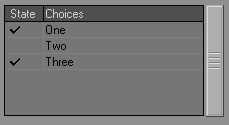 A Multi List Box, 2 columns, for 5 items. 200 pixels width.How to add a AddMultiListbox control = Panel.AddMultiListbox<yourclass>("Multi List Box", 200, 5, 0);// On your header(yourclass.h) file:{public:// CALLBACKS// Templated MultilistBox Callbacksint controlCount(lwpp::PanelControl& lwcontrol)// Constructor & Destructoryourclass (void *priv, void *context, LWError *err);~yourclass ();protected:// The member for the Multi List Box controllwpp::PanelControl control;};// On your source (yourclass.cpp) file:// List of items for the control// The checks of each item//Constructoryourclass::yourclass( void *priv, void *context, LWError *err) :lwpp::LWPanelMasterHandler(priv, context, err),{ ; }// Destructoryourclass::~yourclass(){ ; }// CONTROL COUNT CALLBACKint yourclass::controlCount(lwpp::PanelControl& lwcontrol){if (lwcontrol == control){return 3;}return 0;}// MULTILIST BOX NAME CALLBACK{// LW is asking for the column namesif (index == -1){switch (column){case 0: return "State"; break; // Title of the 1st columncase 1: return "Choices"; break; // Title of the 2nd column}}// String used to return the check markstatic std::string ret;ret.clear();// LW is asking for the valuesif ( index >= 0 && index < 3 ){// Check the columnswitch (column){case 0:{if(choicesState[index]){ ret = "\03(i:MIMG_CHECKMARK)"; // The check symbol} else{ret = "";}return (char *)ret.c_str();break;}case 1: return choices[ index ];break;default:return NULL;break;}}return (char *)ret.c_str();}// MULTILIST BOX COLUMN WIDTH CALLBACK{// Return different widths depending of the colum indexswitch (colindex){case 0: return 35; // 15 pixels for the 1st columncase 1: return 165; // 185 pixels for the 2nd columncase 2: return 0; // Returning 0 for a column with indicates is the last onedefault: return 0;}}// CONTROL EVENT CALLBACKvoid yourclass::controlEvent(lwpp::PanelControl& lwcontrol){// If it's the multilist boxif (lwcontrol == control){// Do here what you want when the user clicks the control....}}// LWPANEL CREATIONLWError yourclass::Options (){// Creates the panel with titlePanel.Create("Your Panel Title Here");// SET THE PANEL USER DATAPanel.SetUserData(this);// ADD THE CONTROLScontrol = Panel.AddMultiListbox<yourclass>("Multi List Box", 200, 5, 0);// SET THE CALLBACKScontrol.SetEventCallback<yourclass>();// Opens a NON Modal PanelPanel.Open(PANF_FRAME | PANF_NOBUTT | PANF_RESIZE);// Opens a Modal Panel// Panel.Open(PANF_FRAME | PANF_BLOCKING);return AFUNC_OK;}ServerTagInfo yourclass_tags[] ={{ "Your Plugin Name", SRVTAG_USERNAME },{ "Your Plugin Description", SRVTAG_DESCRIPTION },{ NULL }};lwpp::LWPanelMasterAdaptor<yourclass, 4, 4, LWMAST_SCENE> Yourclass_Instance("Your Master Plugin Name", yourclass_tags);
|
inline |
Adds a series of mutually exclusive buttons.
- Parameters:
-
*title The label for the control **items Pointer to a NULL terminated array for the options. i.e: static char *choices[] = { "One", "Two", "Three", NULL }; orientation The orientation for the control
- Returns:
- a pointer to the created LWControl
How to add a AddChoice static char *choices[] = { "One", "Two", "Three", NULL }; control = Panel.AddChoice("PopUp", choices, true);
|
inline |
Adds a rectagular OpenGL area with a border. OpenGL commands can be used in this control, after set a callback for it.
   @image html panelopengl.jpg "An OpenGL area of 75x50 pixels."
   How to add a AddOpenGL
   control = Panel.AddOpenGL("OpenGL", 75, 50);
   @param *title The label for the control
   @param width The width in pixels of the control
   @param height The height in pixels of the control
|
inline |
Adds a sized tree with the channels present on the scene.
   \xrefitem todo 10.        @image html pannelpalette.jpg "A palette of 125x300 pixels."
   How to add a AddPalette
   control = Panel.AddPalette("Palette", 125, 300);
   @param *title The label for the control
   @param width The width in pixels of the control
   @param height The height in pixels of the control
|
inline |
Adds a mini slider with an edit field, for values as percentages.
   @image html panelpercent.jpg "A numeric control for double values"
   How to add a AddPercent
   control = Panel.AddPercent("Percent Value");
   @param *title The label for the control
|
inline |
Adds a pick item pop up control
   @image html panelpickitem.jpg "Pick Item pop up and example choices when the popup is open, the text over the open lists is the LWItemType used for each one"
   How to add a pick item pop up
 control = Panel.AddPickItem("Pick Item", LWI_ANY, 80);
   @param *title The label for the control
   @param type The type of items to be listed. Defined on lwrender.h (line 22)
   @param width The width of the control in pixels
|
inline |
Adds a scrolling pop up menu control. The label will be shown on the control itself.
   @image html panelpopdownc.jpg "A closed pop down"
   @image html panelcustpopupo.jpg "The choices when the popup is open"
   How to add a AddPopdown
   const char *choices[] = { "One", "Two", "Three", NULL };
   control = Panel.AddPopdown("Pop Down", choices);
   @param *title The label for the control
   @param **items Pointer to a NULL terminated array for the options.
   @param orientation The orientation for the control
|
inline |
Adds a pop up control
   @image html panelpopupc.jpg "A closed pop up"
   @image html panelpopupo.jpg "The choices when the popup is open"
   How to add a AddPopUp
 static char *choices[] = { "One", "Two", "Three", NULL };
 control = Panel.AddPopUp("PopUp", choices, 50);
   @param *title The label for the control
   @param **items Pointer to a NULL terminated array for the options.
   @param orientation The orientation for the control
|
inline |
Adds a RGB control for color values
   @image html panelrgbcolor.jpg "A RGB control for color values"
   How to add a AddRGB
   control = Panel.AddRGB("RGB Color");
   @param *title The label for the control
|
inline |
Adds a RGB Vector control for color values
   @image html panelrgbveccolor.jpg "A RGB Vector control for color values"
   How to add a AddRGBVector
   control = Panel.AddRGBVector("RGB Vector Color");
   @param *title The label for the control
|
inline |
Adds a save file edit field with an arrow button to open the OS requester to select files
   @image html panelsavefile.jpg "A save file edit field with a fake file name. 25 characters long."
   How to add a AddSave
   control = Panel.AddSave("Save File", 25);
   control.Set<const char *>("C:\\temp.file");
   @param *title The label for the control
   @param width The width in characters of the control
|
inline |
Adds a Save File button
   @image html panelsavefilebutton.jpg "A Save File button."
   How to add a AddSaveButton
   control = Panel.AddSaveButton("Save File", 65);
   @param *title The label for the control
   @param width The width in pixels of the control
|
inline |
Adds a slider with an edit field, edit's field value can't be bigger than its max range.
   @image html panelslider.jpg "A slider control with a (min = 0, max = 100)"
   How to add a AddSlider
   control = Panel.AddSlider("Slider", 0, 100, 100);
   @param *title The label for the control
   @param min The minimun value for the slider
   @param max The maximun value for the slider
   @param width The width of the control in pixels
   @param type Type of the control to allow this function be used by AddVerticalSlider for example
|
inline |
Adds an edit field for a string of text
   @image html paneltfstring.jpg "An empty edit field for a string text. 25 characters long."
   How to add a AddString
   control = Panel.AddString("Text Field", 25);
   @param *title The label for the control
   @param width The width in characters of the control
   @param type Type of the control to allow this function be used by AddStringInfo for example
|
inline |
Adds a Read Only field for a string of text
   @image html paneltfstringinfo.jpg "An empty field for a string text. 25 characters long."
   How to add a AddStringInfo
   control = Panel.AddStringInfo("Info Text Field", 25);
   @param *title The label for the control
   @param width The width in characters of the control
|
inline |
Adds a series of tabs.
   @image html paneltabs.jpg "A series of tabs"
   How to add a AddTabs
   const char *choices[] = { "One", "Two", "Three", NULL };
   control = Panel.AddTabs("Tabs", choices);
   @param *title The label for the control
   @param **items Pointer to a NULL terminated array for the options.
|
inline |
Adds a field for static strings of text
   @image html paneltext.jpg "Three static strings of text"
   How to add a AddText
   const char *statictext[] = { "...one line of text", "...two lines of text", "...three lines of text", NULL };
   control = Panel.AddText("Static Text", statictext);
   @param *title The label for the control
   @param text NULL terminated array of static text strings
|
inline |
Adds a Tree Control.
|
inline |
Adds a Tree Control.
|
inline |
Adds a horizontal slider with an edit field, edit's field value CAN be bigger than its max range.
   @image html paneluslider.jpg "A unbounded horizontal slider control with a (min = 0, max = 100). On the image it's value is 0. Note the edit field Value is different to the slider."
   How to add a AddUnboundSlider
   control = Panel.AddUnboundSlider("Unbound Slider", 0, 100, 100);
   @param *title The label for the control
   @param min The minimun value for the slider
   @param max The maximun value for the slider
   @param width The width of the control in pixels
|
inline |
Adds a vertical drag button (mini slider) WITHOUT an edit field.
   @image html panelvdragbutton.jpg "A vertical drag button control."
   How to add a AddVDragButton
   control = Panel.AddVDragButton("Vertical Drag Button");
   @param *title The label for the control
|
inline |
Adds a numeric control for integer vector values
   @image html panelintvec.jpg "A numeric control for integer vector values"
   How to add a AddVector
   control = Panel.AddVector("Integer Vector Value");
   @param *title The label for the control
   @param type Type of the control to allow this function be used by AddVectorInfo for example
|
inline |
Adds a Read Only numeric control for integer vector values
   @image html panelintvecinfo.jpg "A read only numeric control for integer vector values"
   How to add a AddVectorInfo
   control = Panel.AddVectorInfo("Info Integer Vector Value");
   @param *title The label for the control
|
inline |
Adds a vertical slider without edit field.
   @image html panelvslider.jpg "A vertical slider control with a (min = 0, max = 100). On the image it's value is 0."
   How to add a AddVerticalSlider
   control = Panel.AddVerticalSlider("Slider", 0, 100, 100);
   @param *title The label for the control
   @param min The minimun value for the slider
   @param max The maximun value for the slider
   @param width The width of the control in pixels
|
inline |
Adds an Xpanel embeddedon the LWPanel.
   @image html panelxpanel.jpg "An Xpanel containing an read-only text field."
   How to add a XPanel
   @code
 // On your header(yourclass.h) file:

 class yourclass: public lwpp::LWPanelMasterHandler,
             public lwpp::XPanelInterface
 {
 public:
   // Add the XPANEL variables that define your XPanel
   static LWXPanelHint xpHint[];
   static LWXPanelControl xpCtrl[];
   static LWXPanelDataDesc xpDesc[];

   //Add a function to your class to get the XPanel
   LWXPanelID getXPanel();

   // Constructor & Destructor
   yourclass (void *priv, void *context, LWError *err);
   ~yourclass ();
 protected:
   // The member for the xpanel control
   lwpp::PanelControl control;
 };

 // On your source (yourclass.cpp) file:

 // enum for the XPanel
 enum {  ID_STRG = 0x8001 };

 // XPanel controls
 LWXPanelControl yourclass::xpCtrl[] =
 {
   {ID_STRG, "WARNING", "sInfo"},
   { 0 }
 };

 // XPanel controls descriptions
 LWXPanelDataDesc yourclass::xpDesc[] =
 {
   {ID_STRG, "WARNING", "string"},
   { 0 }
 };
 // XPanel hint
 LWXPanelHint yourclass::xpHint[] =
 {
   XpBORDER( LWXPBDR_NONE ), // No border on the XPanel control
   XpEND
 };
 // The string that appears on the control inside the XPanel
 char yourclass::startInfo[] = "No elements added yet";

 //Constructor
 yourclass::yourclass( void *priv, void *context, LWError *err) :
   lwpp::LWPanelMasterHandler(priv, context, err),
 {
 }
 // Destructor
 yourclass::~yourclass(){ ; }

 LWXPanelID yourclass::getXPanel()
 {
   if (!LW_XPanel.isValid())
   {
     // Create the View for the XPanel
     CreateViewXPanel(xpCtrl,xpDesc,xpHint);
   }
   return LW_XPanel.getID();
 }

 // LWPANEL CREATION
 LWError yourclass::Options ()
 {
   // Creates the panel with title
   Panel.Create("Your Panel Title Here");

   // ADD THE CONTROLS
   control = Panel.AddXPanel("Xpanel", getXPanel());

   // Opens a NON Modal Panel
   Panel.Open(PANF_FRAME | PANF_NOBUTT | PANF_RESIZE);

   // Opens a Modal Panel
   // Panel.Open(PANF_FRAME | PANF_BLOCKING);

   return AFUNC_OK;

 }

 ServerTagInfo yourclass_tags[] =
 {
   { "Your Plugin Name", SRVTAG_USERNAME },
   { "Your Plugin Description", SRVTAG_DESCRIPTION },
   { NULL }
 };

 lwpp::LWPanelMasterAdaptor<yourclass, 4, 4, LWMAST_SCENE> Yourclass_Instance("Your Master Plugin Name", yourclass_tags);

   @endcode
   @param *title The label for the control
   @param xp
|
inlinevirtualinherited |
Check if the global is available.
|
static |
Callback for panel activation.
|
static |
Callback for panel close.
|
inlinestatic |
Callback for panel draw.
|
static |
Static callback for key down.
|
static |
Static callback for key up.
Callback for panel key up.
|
static |
Static callback for mouse button.
Callback for panel mouse button.
|
static |
Static callback for mouse move.
Callback for panel mouse move.
|
static |
Callback for open panel.
|
static |
Callback for panel resize.
|
inline |
|
inline |
Close the panel.
|
inline |
Creates a panel.
|
inline |
Draws the panel After the panel is draw on the screen, it will call your panel draw callbacks if they are set
- Parameters:
-
mode
|
inline |
Draw a Border.
|
inline |
Draws a line.
|
inline |
Draw a resizing handle on the lower left corner.
|
inlineprotected |
Get a panel attribute.
|
inline |
Returns the draw functions for the panel.
|
inlinevirtualinherited |
Get the pointer to the global.
|
inline |
Get panel height in pixels.
|
inline |
Returns the ID of the panel as a LWPanelID.
|
inline |
|
inline |
|
inline |
Get the panel qualifier keys.
|
inline |
Get the panel user data.
|
inline |
Get panel width in pixels.
|
inline |
Returns the global.
|
inline |
Opens and displays a NON-Modal panel, one opened without PANF_BLOCKING. Open is called inmediately and return's the control to handle. The panel must be created first, as it's controls created, sized, positioned and initialized as well.
- Parameters:
-
block If 0, it returns when the event queue is empty, if it's EVNT_BLOCKING, it will not return until the user has closed the panel manually.
- Returns:
- 0 if the panel is still open, or -1 if the user closed it.
|
inline |
Iterates the controls of the panel
|
inline |
Opens and displays the panel.
The panel must be created first, as it's controls created, sized, positioned and initialized as well.
- Parameters:
-
flags an | combination of the PAN_FLAGS defined in lwpanel.h (line 300).
|
inlineinherited |
Get the pointer to the global.
|
inline |
Opens and displays the panel The panel must be created first, as it's controls created, sized, positioned and initialized as well.
- Parameters:
-
flags an | combination of PANF_BLOCKING | PANF_CANCEL | PANF_FRAME and the flags passed, defined in lwpanel.h (line 300).
|
inline |
Recreates the panel.
|
inline |
Recreates the panel with a new title
- Parameters:
-
_title a std:string with the title for the panel
|
inlineprotected |
Set a panel attributes.
- Parameters:
-
tag One of the pTag defined in lwpanel.h (line 175). *data is the panel attribute cast as a void *
|
inline |
|
inline |
|
inline |
|
inline |
|
inline |
Set panel height in pixels.
|
inline |
|
inline |
|
inline |
|
inline |
Set the panel user data.
|
inline |
|
inline |
|
inline |
|
inline |
|
inline |
|
inline |
|
inline |
Set panel width in pixels.
|
inline |
Bring the panel to the front.
|
inline |
Returns a pointer to the userdata.
Member Data Documentation
|
staticprotectedinherited |
Pointer to the global functions.
The documentation for this class was generated from the following files: